<?xml version="1.0" encoding="utf-8"?>
    <feed xmlns="http://www.w3.org/2005/Atom">
        
            <title type="text">vito的技术博客站</title>


        <updated>2024-07-08T20:17:02+08:00</updated>

        
            <id>https://blog.cnvito.top</id>
        
        
            <link rel="alternate" type="text/html" href="https://blog.cnvito.top"/>
            <link rel="self" type="application/atom+xml" href="https://blog.cnvito.top/atom.xml"/>
        
        <rights>Copyright © 2026, vito的技术博客站</rights>
        <generator uri="https://go-sonic.org/" version="v1.1.4">Sonic</generator>
        
            
                <entry>
                    <title><![CDATA[Centos7升级openssh9.8p1后fail2ban不工作]]></title>
                    <link rel="alternate" type="text/html"
                          href="/archives/Centos7openssh98p1fail2ban"/>
                    <id>tag:https://blog.cnvito.top,2024-07-08:Centos7openssh98p1fail2ban</id>
                    <published>2024-07-08T20:17:02+08:00</published>
                    <updated>2024-07-08T20:17:02+08:00</updated>
                    <author>
                        <name>cnvito</name>
                        <uri>https://blog.cnvito.top</uri>
                    </author>
                    <content type="html">
                        
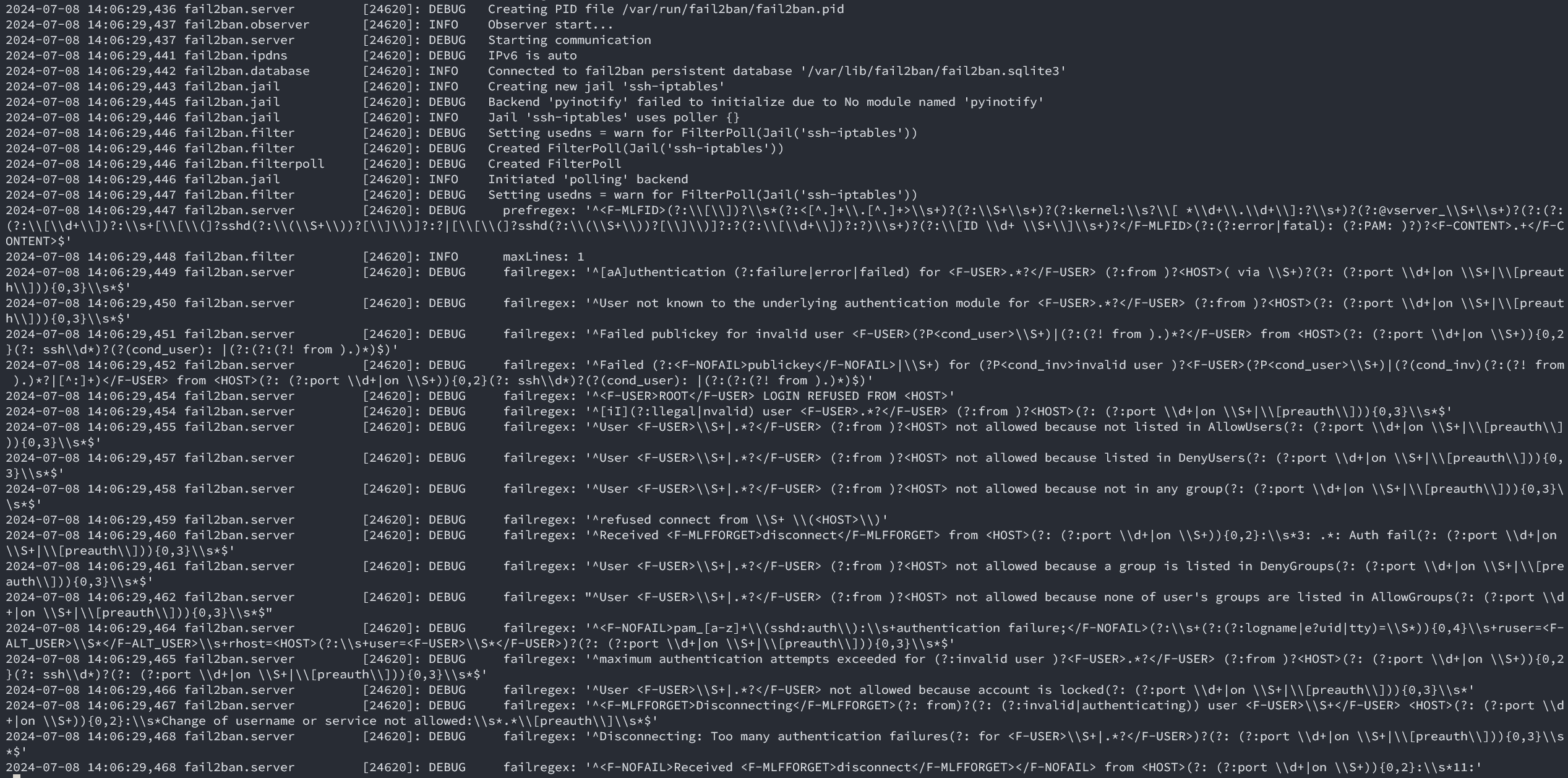
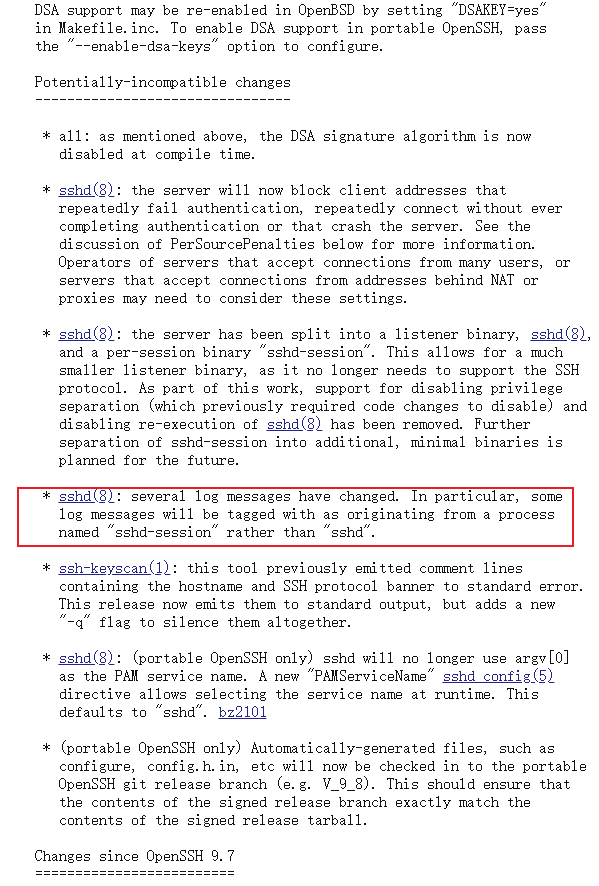
                            <![CDATA[<h2 id="%E8%83%8C%E6%99%AF" tabindex="-1">背景</h2><p>在升级完openssh后几天排查一些其他的问题时，注意到了系统日志多了一些ssh登录失败日志，因为安装了fail2ban不应该突然多了那么多，一检查才发现fail2ban对于sshd日志过滤不生效；</p><p>其实对于centos7来说，本次CVE-2024-6387对yum安装的版本不受影响，为啥我要升级？那当然是之前的一个CVE，具体是哪个忘记了，对于没有固定IP不能使用白名单的个人用户而言，还是得升级的；</p><p>要注意：Centos7升级到最新版本的openssh，必须升级openssl，需要确定业务是否受影响，如果受影响，还是稳健的使用白名单功能吧。</p><h2 id="%E6%8E%92%E6%9F%A5%E6%80%9D%E8%B7%AF" tabindex="-1">排查思路</h2><h3 id="1.%E6%80%80%E7%96%91fail2ban%E8%BF%9B%E7%A8%8B%E5%BC%82%E5%B8%B8%E9%80%80%E5%87%BA" tabindex="-1">1.怀疑fail2ban进程异常退出</h3><p>对于fail2ban工作不正常，第一反应就是fail2ban进程挂掉了，那么看一下进程<code>systemctl status fail2ban</code>；</p><pre><code class="language-shell">● fail2ban.service - Fail2Ban Service   Loaded: loaded (/usr/lib/systemd/system/fail2ban.service; disabled; vendor preset: disabled)   Active: active (running) since Mon 2024-07-08 15:14:04 CST; 5h 6min ago     Docs: man:fail2ban(1) Main PID: 30230 (fail2ban-server)    Tasks: 9   Memory: 13.2M   CGroup: /system.slice/fail2ban.service           └─30230 /usr/bin/python3 /usr/local/bin/fail2ban-server -xf startJul 08 15:14:04 cnvito.top systemd[1]: Stopped Fail2Ban Service.Jul 08 15:14:04 cnvito.top systemd[1]: Starting Fail2Ban Service...Jul 08 15:14:05 cnvito.top systemd[1]: Started Fail2Ban Service.Jul 08 15:14:05 cnvito.top fail2ban-server[30230]: Server ready</code></pre><p>进程似乎没问题，那么重启服务看看？重启问题依旧。</p><p>接着修改<code>/etc/fail2ban/fail2ban.conf</code>的日志等级为<code>DEBUG</code>再看看，重启生效<br /><img src="/upload/2024/07/fail2ban_debug.png" alt="fail2ban_debug" /></p><p>程序能够正常运行，也没有什么报错，那么尝试一下更新规则吧；既然都要更新规则了，顺便把fail2ban也升级为最新好了，用Python写的工具，更新也不会有什么其他太大的影响。</p><h3 id="2.%E5%8D%87%E7%BA%A7%E6%9C%80%E6%96%B0fail2ban%E7%89%88%E6%9C%AC" tabindex="-1">2.升级最新fail2ban版本</h3><ul><li><p>到<a href="https://github.com/fail2ban/fail2ban" target="_blank">fail2ban-github</a>上下载最新版本；releases -&gt; source code 一气呵成；</p></li><li><p>把原来的版本卸载<code>systemctl stop fail2ban &amp;&amp; yum remove fail2ban*</code>；</p></li><li><p>在服务器上解压后安装<code>python3 setup.py install</code>；注意默认centos7只有python2.7，最新版(1.1.0)有python&gt;3.5的要求；</p></li><li><p>安装完成尝试启动<code>systemctl start fail2ban &amp;&amp; systemctl status fail2ban</code>，哦豁报错<code>ModuleNotFoundError: No module named 'fail2ban'</code>，一眼顶针，systemd识别的python3 PYTHONPATH有问题，加个环境变量试一下；</p></li></ul><pre><code class="language-shell"># /usr/lib/systemd/system/fail2ban.service[Service]Environment=&quot;PYTHONPATH=/usr/local/lib/python3.6/site-packages&quot;  # &lt;-- 加的这个</code></pre><p>重新启动<code>systemctl daemon-reload &amp;&amp; systemctl restart fail2ban</code>，OK启动没问题，但是问题依旧。</p><h3 id="3.%E6%B7%B1%E5%85%A5%E6%8E%92%E6%9F%A5%EF%BC%8C%E9%97%AE%E9%A2%98%E8%A7%A3%E5%86%B3" tabindex="-1">3.深入排查，问题解决</h3><p>fail2ban实际上是读取日志，依赖正则表达式一通分析，得到是否被暴力破解的结论；那么问题应该还是出现在规则上，翻一下sshd的规则<code>/etc/fail2ban/filter.d/sshd.conf</code>；</p><p>我靠，这一大坨正则表达式看着就头大，好在官方有工具帮忙分析<code>fail2ban-regex</code>，不然一个个替换去试，人都要麻了；<code>fail2ban-regex --help</code>看一下怎么使</p><pre><code class="language-shell">fail2ban-regex -v /var/log/secure sshd........Failregex: 0 total  # 注意到这一行,啥也没匹配到,为什么呢?........</code></pre><ul><li>/var/log/secure  是日志路径</li><li>sshd 是内置sshd匹配规则</li><li>Failregex: 0 total  意味着没有登录失败的内容</li></ul><p>刚好注意到有openssh升级前的轮询切割日志保存<code>/var/log/secure-20240616</code>；用同样的命令一对比发现同样的规则，旧日志有匹配到被爆破的内容，那么这里已经确定了openssh捣的鬼，再后来翻一下openssh的<a href="https://www.openssh.com/releasenotes.html" target="_blank">版本日志</a>，确实9.8p1确实是修改了日志的字段；</p><p><img src="/upload/2024/07/opensshlog.png" alt="opensshlog" /></p><p>对比一下<code>/var/log/secure-20240616</code>和<code>/var/log/secure</code>的区别，一眼看过去根本没区别，而且不能通过diff命令对比，毕竟是完全不同的文件内容，到这里就很头大了；</p><p>再翻一下github，也没有看到相关的issue；看看<code>config/filter.d/sshd.conf</code>，嗯？<code>5 days ago</code>，难道release包不是最新的？下载下来<code>md5sum</code>，<code>diff</code>一番，果然不一样，就变了一行；坑爹啊！</p><pre><code class="language-ini">[DEFAULT]_daemon = sshd(?:-session)?</code></pre><h3 id="%E6%B5%8B%E8%AF%95" tabindex="-1">测试</h3><pre><code class="language-shell"># _daemon = sshdfail2ban-regex &#39;Jul  7 04:14:46 cnvito sshd-session[8982]: Invalid user admin from 171.244.37.97 port 58998&#39; sshdFailregex: 0 total6) [0] ^[iI](?:llegal|nvalid) user &lt;F-USER&gt;.*?&lt;/F-USER&gt; (?:from )?&lt;HOST&gt;(?: (?:port \d+|on \S+|\[preauth\])){0,3}\s*$# _daemon = sshd(?:-session)?Failregex: 0 total6) [1] ^[iI](?:llegal|nvalid) user &lt;F-USER&gt;.*?&lt;/F-USER&gt; (?:from )?&lt;HOST&gt;(?: (?:port \d+|on \S+|\[preauth\])){0,3}\s*$|      171.244.37.97  Sun Jul 07 04:14:46 2024  ####### &lt;- 注意看这里有匹配到ip了</code></pre><p>OK，测试没问题了，修改一下对应的位置后重启fail2ban即可，<code>systemctl restart fail2ban</code>；</p><p>原来在openssh9.8p1里面管理Session的进程变成了<code>sshd-session</code>，日志也跟着修改了，看一下进程就大概明白了；</p><pre><code class="language-shell">ps -ef | grep [s]shdroot      1120     1  0 Jul04 ?        00:00:17 sshd: /usr/sbin/sshd -D [listener] 0 of 10-100 startupsroot     20499  1120  0 20:11 ?        00:00:00 sshd-session: root [priv]root     20501 20499  0 20:11 ?        00:00:00 sshd-session: root@pts/0</code></pre><p>给我们分配<code>tty</code>的进程是<code>sshd-session</code></p><h3 id="grafana-loki" tabindex="-1">grafana-loki</h3><p>如果你跟我一样把登录日志收集到Loki，用Grafana id=17514(SSH LOGS)这个模板展示数据，那么你会发现这里也获取不到数据了，其实原理也是一样的；</p><p>编辑JSON模型批量替换就可以了，具体就是<code>|=\&quot;sshd[\&quot;</code><br /><img src="/upload/2024/07/openssh_loki1.png" alt="openssh_loki1" /><br />改成这样<code>|~`sshd(?:-session)?\\[` </code><br /><img src="/upload/2024/07/openssh_loki2.png" alt="openssh_loki2" /></p>]]>
                        
                    </content>
                </entry>
            
                <entry>
                    <title><![CDATA[如何免费的获取域名whois信息]]></title>
                    <link rel="alternate" type="text/html"
                          href="/archives/whois"/>
                    <id>tag:https://blog.cnvito.top,2024-04-28:whois</id>
                    <published>2024-04-28T21:47:05+08:00</published>
                    <updated>2024-04-28T21:47:05+08:00</updated>
                    <author>
                        <name>cnvito</name>
                        <uri>https://blog.cnvito.top</uri>
                    </author>
                    <content type="html">
                        
                            <![CDATA[<p><img src="/upload/2024/04/WHOIS_Share.png" alt="WHOIS_Share" /></p><h2 id="%E5%89%8D%E8%A8%80" tabindex="-1">前言</h2><p>whois信息在当下不同以前，以前可以获取到域名所有者的一些联系信息，后面为了保护个人隐私，我们能查到的whois信息已经相当有限，当然如果能拖运营商的库就令当别论了；</p><p>那么我为啥还要获取域名的whois信息呢？很简单，为了域名到期监控，如果我有一个非常值钱的域名，我又忘记续费被人抢注了，那岂不非常可惜；</p><p>当然使用whois获取到期信息也不一定是准确的，因为有些运营商可能会在域名到期后更新到期时间（即时没有续费），用这种手段防止别人抢注，比如阿里收购的新网；</p><h2 id="%E8%8E%B7%E5%8F%96whois" tabindex="-1">获取whois</h2><p>我们这里不是使用第三方的api，而是直接找<a href="https://www.iana.org/" target="_blank">INAN机构</a>问我们在哪个二级分销商买的域名，我们可以从二级分销商拿到whois，所以我们分两部走；</p><ol><li>获取注册的whois机构</li><li>获取whois信息</li></ol><p>这里使用linux中的<code>nc</code>命令简单获取，当然其实使用telnet客户端也是可以的；</p><pre><code class="language-bash">#!/bin/bashutc2local(){    local utc_date=$1    unix_timestamp=&quot;$(date -u -d &quot;${utc_date}&quot; &#39;+%s&#39;)&quot;    date -d &quot;@${unix_timestamp}&quot; &quot;+%F %T&quot;}check_domain=&quot;cnvito.top&quot;refer=&quot;$(nc -w 15 whois.iana.org 43 &lt;&lt;&lt;&quot;${check_domain}&quot; | awk &#39;/refer/{print $2}&#39;)&quot;if [ -z &quot;${refer}&quot; ]; then    echo &quot;failed to get whois refer&quot;    exit 1fidata=&quot;$(nc -w 15 ${refer} 43 &lt;&lt;&lt;&quot;${check_domain}&quot;)&quot;created_at=&quot;$(awk &#39;/Creation Date/{print $3}&#39; &lt;&lt;&lt;&quot;${data}&quot;)&quot;expired_at=&quot;$(awk &#39;/Registry Expiry Date/{print $4}&#39; &lt;&lt;&lt;&quot;${data}&quot;)&quot;printf &#39;{&quot;domain&quot;: &quot;%s&quot;, &quot;created_at&quot;: &quot;%s&quot;,  &quot;expired_at&quot;: &quot;%s&quot;}\n&#39; \    &quot;${check_domain}&quot; \    &quot;$(utc2local ${created_at})&quot; \    &quot;$(utc2local ${expired_at})&quot;</code></pre><p>得到结果：</p><pre><code class="language-json">{  &quot;domain&quot;: &quot;cnvito.top&quot;,  &quot;created_at&quot;: &quot;2018-07-15 16:14:16&quot;,  &quot;expired_at&quot;: &quot;2024-07-15 16:14:16&quot;}</code></pre><h2 id="%E4%BD%BF%E7%94%A8rdap%E7%9A%84%E6%96%B9%E5%BC%8F" tabindex="-1">使用RDAP的方式</h2><blockquote><p>43号端口的获取方式可能会被弃用，更推荐使用rdap</p></blockquote><pre><code class="language-bash">#!/bin/bashdomain=&quot;$1&quot;domain=&quot;$(sed &#39;s/\.$//&#39; &lt;&lt;&lt;&quot;${domain}&quot;)&quot;top_domain=&quot;${domain##*.}&quot;# 1.去iana拿到顶级域名服务商dns_service=&quot;$(curl -sf https://data.iana.org/rdap/dns.json)&quot;  # ipv4.json ipv6.json asn.jsonif [[ &quot;$?&quot; -ne 0 ]]; then    exit 1fi# com  https://rdap.verisign.com/com/v1/refers=&quot;$(jq -rc &#39;first(.services[] | select(any(.[0][]; . == $td )) | .[1][])&#39; --arg td ${top_domain} &lt;&lt;&lt;&quot;${dns_service}&quot;)&quot;for el in ${refers}; do    req_url=&quot;${el}domain/${domain}&quot;    curl -sf &quot;${el}domain/${domain}&quot; -H &#39;Accept: application/json,application/rdap+json&#39; | \      jq -rc &#39;.events[] | select(.eventAction | test(&quot;(registration|expiration)&quot;)) | .eventAction + &quot;|&quot; + .eventDate&#39;    if [[ &quot;${PIPESTATUS[@]}&quot; = &quot;0 0&quot; ]]; then        break    fidone</code></pre>]]>
                        
                    </content>
                </entry>
            
                <entry>
                    <title><![CDATA[使用Python获取远程站点ssl证书信息]]></title>
                    <link rel="alternate" type="text/html"
                          href="/archives/Pythonssl"/>
                    <id>tag:https://blog.cnvito.top,2024-04-21:Pythonssl</id>
                    <published>2024-04-21T20:21:30+08:00</published>
                    <updated>2024-04-21T20:21:30+08:00</updated>
                    <author>
                        <name>cnvito</name>
                        <uri>https://blog.cnvito.top</uri>
                    </author>
                    <content type="html">
                        
                            <![CDATA[<h2 id="python%E8%84%9A%E6%9C%AC" tabindex="-1">python脚本</h2><p>有时候我们会有一些需求，需要批量检查自己的域名证书的到期时间，用于提前告警续费，使用python可以轻松的完成这个任务;<br />这里有用到第三方库<code>pip install -U cryptography</code>，没有考虑站点重定向等情况，低版本python或cryptography需要改一些内容。</p><pre><code class="language-python">import socketimport sslfrom concurrent.futures import ThreadPoolExecutor, as_completedfrom typing import Sequencefrom zoneinfo import ZoneInfofrom cryptography import x509context = ssl.create_default_context(ssl.Purpose.SERVER_AUTH)context.load_default_certs()context.check_hostname = Truecontext.verify_mode = ssl.CERT_REQUIREDdef get_certificate(domain, port=443, timeout=5) -&gt; dict:    &quot;&quot;&quot;https://docs.python.org/3/library/ssl.html&quot;&quot;&quot;    with socket.create_connection((domain, port), timeout=timeout) as _sock:        with context.wrap_socket(_sock, server_hostname=domain) as sslsock:            # cert = ssl.DER_cert_to_PEM_cert(sslsock.getpeercert(True))  # 证书加载为pem格式            cert_bytes = sslsock.getpeercert(True)            if cert_bytes is None:                return {}            certificate = x509.load_der_x509_certificate(cert_bytes)            expired = certificate.not_valid_after_utc.astimezone(ZoneInfo(&quot;Asia/Shanghai&quot;))            created = certificate.not_valid_before_utc.astimezone(ZoneInfo(&quot;Asia/Shanghai&quot;))            return {                &quot;domain&quot;: domain,                &quot;version&quot;: certificate.version.name,                &quot;algorithm&quot;: certificate.signature_hash_algorithm.name,                &quot;subject&quot;: certificate.subject.rfc4514_string(),                &quot;issuer&quot;: certificate.issuer.rfc4514_string(),                &quot;expired_at&quot;: expired.strftime(&quot;%F %T&quot;),                &quot;created_at&quot;: created.strftime(&quot;%F %T&quot;),            }def multi_get_certificate(domains: Sequence[str]) -&gt; list[dict]:    result = []    with ThreadPoolExecutor(max_workers=3) as pool:        tasks = {pool.submit(get_certificate, domain): domain for domain in domains}        for task in as_completed(tasks):            domain = tasks[task]            try:                result.append(task.result(timeout=10))  # 10s强行断开            except Exception as exc:                print(f&quot;{domain=}: failed to get certificate: {exc}&quot;)    return resultif __name__ == &quot;__main__&quot;:    domains = (&quot;baidu.com&quot;, &quot;jd.com&quot;, &quot;qq.com&quot;, &quot;aliyun.com&quot;)    print(multi_get_certificate(domains))</code></pre><p>如果要检查的是本地证书只需要读取证书，传入<code>x509.load_pem_x509_certificate</code>方法即可。</p><h3 id="%E8%84%9A%E6%9C%AC%E8%BF%90%E8%A1%8C" tabindex="-1">脚本运行</h3><p>输出以下内容</p><pre><code class="language-json">[{&quot;domain&quot;: &quot;qq.com&quot;, &quot;version&quot;: &quot;v3&quot;, &quot;algorithm&quot;: &quot;sha256&quot;, &quot;subject&quot;: &quot;CN=qq.com,O=Shenzhen Tencent Computer Systems Company Limited,L=Shenzhen,ST=Guangdong Province,C=CN&quot;, &quot;issuer&quot;: &quot;CN=DigiCert Secure Site CN CA G3,O=DigiCert Inc,C=US&quot;, &quot;expired_at&quot;: &quot;2024-06-10 07:59:59&quot;, &quot;created_at&quot;: &quot;2023-05-10 08:00:00&quot;}, {&quot;domain&quot;: &quot;jd.com&quot;, &quot;version&quot;: &quot;v3&quot;, &quot;algorithm&quot;: &quot;sha256&quot;, &quot;subject&quot;: &quot;CN=*.jd.com,O=BEIJING JINGDONG SHANGKE INFORMATION TECHNOLOGY CO.\\, LTD.,L=Beijing,ST=Beijing,C=CN&quot;, &quot;issuer&quot;: &quot;CN=GlobalSign RSA OV SSL CA 2018,O=GlobalSign nv-sa,C=BE&quot;, &quot;expired_at&quot;: &quot;2024-12-09 09:34:41&quot;, &quot;created_at&quot;: &quot;2023-11-08 09:34:42&quot;}, {&quot;domain&quot;: &quot;baidu.com&quot;, &quot;version&quot;: &quot;v3&quot;, &quot;algorithm&quot;: &quot;sha256&quot;, &quot;subject&quot;: &quot;CN=www.baidu.cn,O=BeiJing Baidu Netcom Science Technology Co.\\, Ltd,ST=\u5317\u4eac\u5e02,C=CN&quot;, &quot;issuer&quot;: &quot;CN=DigiCert Secure Site Pro CN CA G3,O=DigiCert Inc,C=US&quot;, &quot;expired_at&quot;: &quot;2025-03-02 07:59:59&quot;, &quot;created_at&quot;: &quot;2024-01-30 08:00:00&quot;}, {&quot;domain&quot;: &quot;aliyun.com&quot;, &quot;version&quot;: &quot;v3&quot;, &quot;algorithm&quot;: &quot;sha256&quot;, &quot;subject&quot;: &quot;CN=*.aliyun.com,O=Alibaba (China) Technology Co.\\, Ltd.,L=HangZhou,ST=ZheJiang,C=CN&quot;, &quot;issuer&quot;: &quot;CN=GlobalSign Organization Validation CA - SHA256 - G3,O=GlobalSign nv-sa,C=BE&quot;, &quot;expired_at&quot;: &quot;2024-12-30 16:21:02&quot;, &quot;created_at&quot;: &quot;2023-12-07 15:21:04&quot;}]</code></pre>]]>
                        
                    </content>
                </entry>
            
        
    </feed>